
TuriTop OCTO API
OCTO (Open Connectivity for Tours, Activities & Attractions)
Introduction
This document describes TuriTop's implementation of the OCTO API standard for the tours, activities, and attractions sector. OCTO enables connectivity between suppliers (like TuriTop) and resellers/OTAs, providing a standardized interface for product discovery, availability checking, and booking management.
The API follows RESTful principles using HTTPS and JSON data format. All requests and
responses use the application/json content type.
OCTO Standard
OCTO (Open Connectivity for Tours, Activities and Attractions) is an open standard API specification maintained by the travel industry. It defines schemas, endpoints, and capabilities for connecting platforms, resellers, OTAs, and suppliers.
For the full OCTO specification, visit docs.octo.travel.
Authentication
The OCTO API uses Bearer token authentication. Include your API key in the
Authorization header of every request. The bearer suffix
determines the behavior of the call: three forms are reachable.
Supplier mode — no suffix
Requests are scoped to the caller's own products and bookings. This is the only way to retrieve own products.
Authorization: Bearer {your_API_key}Scoped reseller mode — single supplier
The suffix is the short_id of one of the suppliers whose products
the caller has accepted to resell. Returns only that supplier's
accepted resales, flattened to the original supplier's identity.
Authorization: Bearer {your_API_key}/{supplier-short-id}Aggregated reseller mode — wildcard
Returns ALL of the caller's accepted resales, flattened to their original suppliers. The caller's own supplier-mode products are NOT included — to retrieve those, drop the suffix.
Authorization: Bearer {your_API_key}/*
Using the caller's own short_id as a suffix is rejected with
403 SUPPLIER_NOT_REACHABLE. A suffix that matches
neither the caller's own short_id nor an accepted-resale supplier
is also rejected with 403.
See Reseller Mode for full details.
Contact TuriTop to obtain your API key for integration.
Headers
The OCTO API enforces a small, standard HTTP header contract before any business logic runs. The tables below summarize the request headers a caller may send and the headers TuriTop returns on the response.
Request headers
| Header | Required | Detail |
|---|---|---|
Authorization |
Yes, always | Authorization: Bearer {your_API_key}. Accepts an optional suffix /<supplier_short_id> to scope the call to a single Supplier (see Authentication). Missing or invalid token → 403; recognized company without OCTO access enabled → 401. |
Content-Type |
On body methods: POST, PUT, PATCH, DELETE | Must be application/json. Required on DELETE even when the request carries no body. If absent (or not application/json) on a body method → 400. Not required on GET. |
Accept |
No (optional) | Defaults to application/json. Accept: text/html returns the body rendered as HTML; absent, */*, or application/json return JSON. The value never affects admission. |
Octo-Capabilities |
No (optional, always) | Comma-separated list; each token MUST carry the octo/ prefix (e.g. octo/pricing, octo/content). TuriTop treats this header as optional on every call, even though the official OCTO standard marks it as Required. Omit it to request no extra capabilities. An unprefixed or unknown value → 400. |
Response headers
| Header | Detail |
|---|---|
Content-Type |
Reflects the negotiated format: application/json by default; text/html when the request sends Accept: text/html. |
Octo-Capabilities |
Echo of the capabilities actually applied to the response. |
Reseller Mode
A caller is treated as a reseller on requests that carry a resale-targeting suffix. The same API key serves both supplier and reseller modes: the mode of any given request is decided by the bearer suffix, not by the caller's identity.
How the suffix changes the scope
- No suffix — supplier mode. Returns the caller's own products and bookings.
- Suffix
/{supplier-short-id}— scoped reseller mode. Returns only that supplier's accepted resales, flattened to the original supplier's identity. - Suffix
/*(wildcard) — aggregated reseller mode. Returns ALL accepted resales, flattened. Own products are NOT included. - Suffix matching the caller's own
short_id— rejected with403SUPPLIER_NOT_REACHABLE. The no-suffix form is the only way to retrieve own products. - Invalid suffix (neither own short_id nor accepted resale) — rejected with
403.
When to use each suffix
- No suffix — you want your own catalog (you act as a supplier).
/{supplier-short-id}— you want a single original supplier's catalog you have resale-accepted. Use when integrating one supplier at a time./*(wildcard) — you want the full aggregated reseller catalog (every supplier you have resale-accepted, flattened). Use when you need to enumerate all resale inventory in a single call.
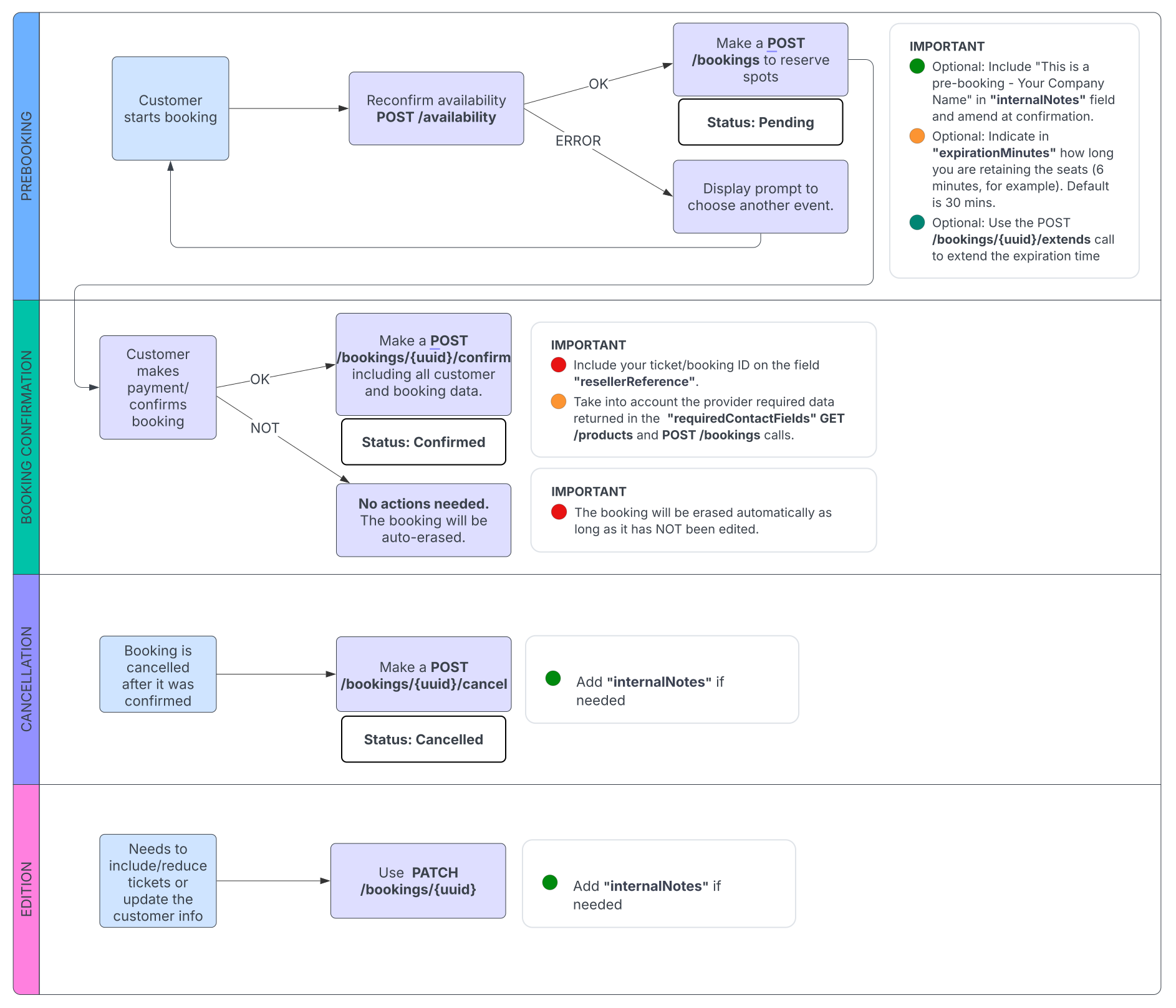
Recommended OTA resale flow
The diagram below shows the recommended end-to-end flow for an OTA reselling TuriTop suppliers' products through the OCTO API.
How to use it
1. Generate your API key as usual (see Get your API Key).
2. Decide the mode for each request:
# Supplier mode — your own catalog
curl -H "Authorization: Bearer abc123" \
     https://apitokio.turitopdev.es/octo/products

# Scoped reseller mode — one supplier's accepted resales, flattened
curl -H "Authorization: Bearer abc123/K3" \
     https://apitokio.turitopdev.es/octo/products

# Aggregated reseller mode — ALL accepted resales, flattened
curl -H "Authorization: Bearer abc123/*" \
     https://apitokio.turitopdev.es/octo/products
Placeholder token abc123 and supplier short_id
K3 are illustrative. The supplier short_id is the identifier
shown to the reseller when a product resale request is made in the
TuriTop marketplace.
Endpoints affected by the bearer suffix
The endpoints below change their behavior depending on the bearer suffix. All other endpoints behave identically across modes.
| Method | Endpoint | Behavior by suffix |
|---|---|---|
| GET | /supplier |
No suffix → returns the caller's own supplier identity. With /<supplier_short_id> → returns only that supplier. With /* → returns all accepted-resale suppliers (no own). |
| GET | /products |
No suffix → returns the caller's own products (supplier mode). With /<supplier_short_id> → returns only that supplier's accepted resales, flattened. With /* → returns ALL accepted resales, flattened (no own products). Orphan duplicates are skipped and logged as warnings. |
| GET | /products/{id} |
Returns the product only if it is reachable under the active suffix mode (own product when no suffix, scoped supplier's resale when /<supplier_short_id>, any accepted resale when /*). Suffix mismatch → 403 SUPPLIER_NOT_REACHABLE; product out of scope under the active mode → 403 PRODUCT_NOT_REACHABLE. |
| POST | /availability |
When suffix is set, resolves the real supplier via the product's resale relationship before checking availability. Without suffix, queries the caller's own product. |
| POST | /availability/calendar |
Same supplier resolution as /availability. |
| POST | /bookings |
No suffix → persists id_company = caller, id_reselling_company = NULL (caller's own supplier-mode booking). With /<supplier_short_id> matching the booked product's supplier → persists id_company = supplier_real_id, id_reselling_company = caller_company_id (reseller-mode booking). With /* → supplier is inferred from the booked product via accepted resales; if not found, 403. Accepts resellerReference and stores it as the booking's reference. |
| POST | /bookings/{uuid}/confirm |
Allows the action only if the caller owns the booking either as supplier (id_company) or as reseller (id_reselling_company). |
| POST | /bookings/{uuid}/cancel |
Same ownership check as confirm. |
| GET | /bookings |
Returns bookings the caller owns as supplier (id_company = caller) or as reseller (id_reselling_company = caller), restricted by the active suffix mode. |
| GET | /bookings/{uuid} |
Returns the booking only if caller matches id_company OR id_reselling_company; otherwise 404. |
Get your API Key
To use the OCTO API, you need a secret API key. You can generate one from your TuriTop dashboard under Components / Integrations → Octo API.
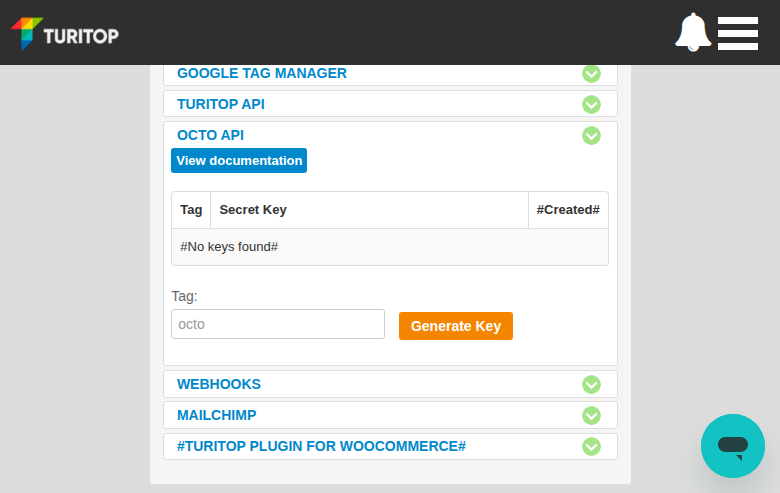
Step 1: Navigate to Octo API
Go to your company settings and open the Components / Integrations section in the left sidebar. Find Octo API in the list and expand it. You will see a table for your API keys (initially empty) and a Tag field with a Generate Key button.
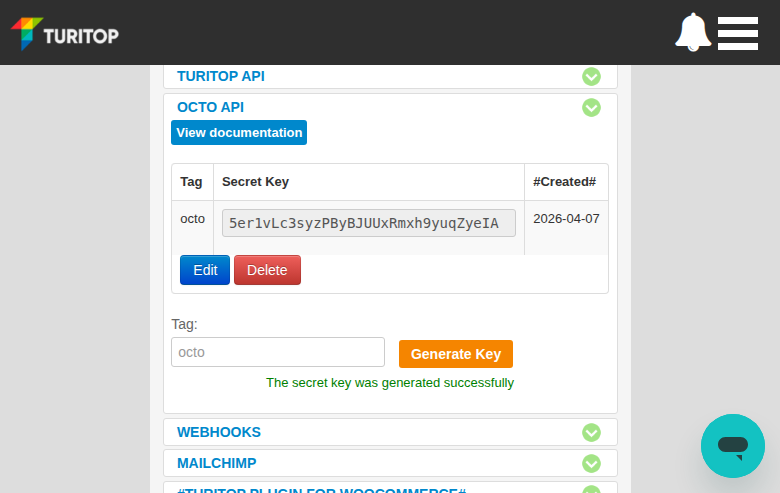
Step 2: Generate your key
Enter an optional tag to identify the key (e.g. the reseller name) and click Generate Key. Your new secret key will appear in the table along with the creation date.
Step 3: Use the key
Copy the Secret Key value and include it in the Authorization header of every API request:
Authorization: Bearer IFB3USKkyXcnf6tGTJrWtWItfCbAlPMWYou can generate multiple keys with different tags (e.g. one per reseller). Use the Edit button to rename a tag, or Delete to revoke a key.
Capabilities
Capabilities are optional features that extend the base API response. Declare them
via the Octo-Capabilities header.
Supported capabilities: octo/pricing, octo/content, octo/notifications, octo/pickups.
Example header:
Octo-Capabilities: octo/pricing, octo/contentThe API Endpoints section below documents the base response (without capabilities). Detailed documentation for each capability and the additional fields they add is available in the Capabilities section at the bottom of this page.
Booking Flow
The standard OCTO booking flow follows these steps:
- GET /products — Browse available products
- POST /availability/calendar — Show calendar with available dates
- POST /availability — Get specific timeslots and
availabilityId - POST /bookings — Reserve (status: ON_HOLD, holds availability)
- POST /bookings/{uuid}/confirm — Confirm with contact details (status: CONFIRMED)
Optional steps:
- POST /bookings/{uuid}/extend — Extend hold if more time is needed
- PATCH /bookings/{uuid} — Update booking details
- POST /bookings/{uuid}/cancel — Cancel a booking
If allowFreesale is true on the product, step 3 (availability check)
is optional but recommended to check for closures.
Error Handling
All error responses use HTTP 400 with a JSON body:
{
  "error": "ERROR_CODE",
  "errorMessage": "Human-readable message"
}
Error codes:
BAD_REQUESTUNAUTHORIZEDFORBIDDENUNPROCESSABLE_ENTITYINTERNAL_SERVER_ERRORNOT_FOUNDTOO_MANY_REQUESTSINVALID_PRODUCT_IDINVALID_OPTION_IDINVALID_UNIT_IDINVALID_AVAILABILITY_IDINVALID_BOOKING_UUIDPRODUCT_NOT_REACHABLESUPPLIER_NOT_REACHABLESUBSCRIPTION_NOT_FOUND
Notes & references
TuriTop distinguishes between three types of free-text notes and references in the booking flow:
| Channel | Field | Audience | Description |
|---|---|---|---|
| Customer note | contact.notes |
Supplier + reseller staff |
Free-text note entered by the customer (or reseller on the customer's behalf) at booking time.
Sent in POST /bookings/{uuid}/confirm inside the contact object.
Persisted on the booking record and returned in GET /bookings/{uuid}.
Mapped internally to the product's "comments" form field.
|
| Internal / operator note | internalNotes |
Reseller/staff API consumer only — never the end customer |
Staff-only internal note. Can be written via POST /bookings and
PATCH /bookings/{uuid}, and is returned in every booking response
(GET /bookings/{uuid}, confirm, cancel, extend). Distinct from the public
notes field. On PATCH, sending internalNotes with
an empty string clears the existing note; omitting the key leaves it unchanged.
|
| Reseller annotation | resellerReference |
Reseller's own reference |
Use resellerReference in POST /bookings/{uuid}/confirm or
PATCH /bookings/{uuid} to attach a machine-readable, indexed annotation
(e.g. your own voucher number) to a booking. The value is stored and returned in
GET /bookings/{uuid} under the resellerReference field.
|
Which field should I use?
-
Customer leaves a comment at booking time →
send in
contact.notesduringPOST /bookings/{uuid}/confirm. -
Tag a booking with your own voucher ID or internal reference →
send in
resellerReferenceduring confirm or PATCH. -
Write a private staff note visible only to the reseller/staff API consumer
(never the customer) →
send in
internalNotesduringPOST /bookingsorPATCH /bookings/{uuid}.
API Endpoints
Capabilities (Optional Extensions)
Request additional fields by sending the Octo-Capabilities header with a comma-separated list of capabilities.
Pricing
Header: Octo-Capabilities: octo/pricing
Adds pricing information to products, availability, and bookings. All monetary values are integers.
Convert to display value: price / (10 ^ currencyPrecision)
(e.g., 7999 with currencyPrecision=2 = $79.99).
Pricing Object
| Field | Type | Description |
|---|---|---|
original | integer | Advertised marketing price (≥ retail). Display with strikethrough to show savings. |
retail | integer | Customer-facing charge amount, including tax. |
net | integer | null | Wholesale reseller cost. |
currency | string | ISO 4217 currency code (e.g., EUR, USD). |
currencyPrecision | integer | Number of decimal places for display conversion. |
includedTaxes | array | Tax breakdown. Each entry: name (string), original, retail, net (integers). |
Fields added to Product
| Field | Type | Description |
|---|---|---|
defaultCurrency | string | Default currency for the product. |
availableCurrencies | string[] | All supported currencies. |
pricingPer | enum | UNIT (per ticket) or BOOKING (flat per reservation). |
Fields added to Unit (when pricingPer = UNIT)
| Field | Type | Description |
|---|---|---|
pricingFrom | Pricing[] | Starting/indicative prices (one per currency). From suffix = not final. |
Example — Unit with pricing:
{
  "id": "unit_adult",
  "type": "ADULT",
  "reference": "ADULT",
  "pricingFrom": [
    {
      "original": 4500,
      "retail": 4500,
      "net": 3500,
      "currency": "USD",
      "currencyPrecision": 2,
      "includedTaxes": [
        { "name": "VAT 10%", "retail": 409, "net": 318 }
      ]
    }
  ]
}
Fields added to Availability Calendar (POST /availability/calendar)
| Field | Type | Description |
|---|---|---|
unitPricingFrom | array | Indicative per-unit pricing. Each entry: unitId + Pricing fields. |
pricingFrom | Pricing | Booking-level indicative pricing (when pricingPer = BOOKING). |
Example — Calendar day response:
{
  "localDate": "2025-07-01",
  "status": "AVAILABLE",
  "capacity": 24,
  "unitPricingFrom": [
    {
      "unitId": "unit_adult",
      "original": 4500,
      "retail": 4500,
      "net": 3500,
      "currency": "USD",
      "currencyPrecision": 2,
      "includedTaxes": [
        { "name": "VAT 10%", "retail": 409, "net": 318 }
      ]
    }
  ]
}
Fields added to Availability Check (POST /availability)
Returns final pricing (no From suffix). This is the binding price for the booking.
| Field | Type | Description |
|---|---|---|
unitPricing | array | Final per-unit pricing. Each entry: unitId + Pricing fields. |
pricing | Pricing | Aggregated booking-level pricing. |
Example — Availability check response:
{
  "id": "2025-07-01T11:30:00+02:00",
  "status": "AVAILABLE",
  "unitPricing": [
    {
      "unitId": "unit_adult",
      "original": 4500,
      "retail": 4500,
      "net": 3500,
      "currency": "EUR",
      "currencyPrecision": 2,
      "includedTaxes": [
        { "name": "VAT 10%", "retail": 409, "net": 318 }
      ]
    }
  ],
  "pricing": {
    "original": 9000,
    "retail": 9000,
    "net": 7000,
    "currency": "EUR",
    "currencyPrecision": 2,
    "includedTaxes": [
      { "name": "VAT 10%", "retail": 818, "net": 636 }
    ]
  }
}
Fields added to Booking
| Field | Type | Description |
|---|---|---|
pricing | Pricing | Booking-level pricing totals. |
unitItems[].pricing | Pricing | Per-unit pricing on each booked unit item. |
Example — Booking response (partial):
{
  "uuid": "4de58057-e7bd-4ec0-be9b-08eb674098b9",
  "status": "CONFIRMED",
  "pricing": {
    "original": 9000,
    "retail": 9000,
    "net": 7000,
    "currency": "EUR",
    "currencyPrecision": 2,
    "includedTaxes": [
      { "name": "VAT 10%", "retail": 818, "net": 636 }
    ]
  },
  "unitItems": [
    {
      "uuid": "a1b2c3d4-...",
      "unitId": "unit_adult",
      "pricing": {
        "original": 4500,
        "retail": 4500,
        "net": 3500,
        "currency": "EUR",
        "currencyPrecision": 2,
        "includedTaxes": [
          { "name": "VAT 10%", "retail": 409, "net": 318 }
        ]
      }
    }
  ]
}
From suffix (e.g., pricingFrom, unitPricingFrom) are indicative/starting prices.
Fields without From (e.g., pricing, unitPricing) are final binding prices used in the booking.
Content
Header: Octo-Capabilities: octo/content
Adds rich media, descriptions, and structured content to products, options, units, and availability. Supports localization via request headers.
Localization Headers
| Header | Direction | Description |
|---|---|---|
Accept-Language | Request | Preferred languages (BCP 47), e.g. fr-FR, fr;q=0.9, en;q=0.8 |
Content-Language | Response | Language of returned content. |
Available-Languages | Response | All available languages for the content. |
Fields added to Product and Option
| Field | Type | Description |
|---|---|---|
title | string | Customer-facing display name. |
shortDescription | string | null | Brief marketing summary. |
description | string | null | Long-form narrative description. |
features | array | Structured features (see types below). |
faqs | array | FAQ items: question and answer strings. |
media | array | Images, videos (see Media Object below). |
locations | array | Geographic points (see Location Object below). |
durationMinutesFrom | integer | Minimum / exact duration in minutes. |
durationMinutesTo | integer | null | Maximum duration (if flexible). |
categoryLabels | string[] | Tags, e.g. "skip-the-line", "wheelchair-accessible". |
commentary | array | Guide formats: format (IN_PERSON, RECORDED_AUDIO, WRITTEN) + language (BCP 47). |
Feature types
INCLUSION, EXCLUSION, HIGHLIGHT, PREBOOKING_INFORMATION, PREARRIVAL_INFORMATION,
REDEMPTION_INSTRUCTION, ACCESSIBILITY_INFORMATION, ADDITIONAL_INFORMATION,
BOOKING_TERM, CANCELLATION_TERM
Media Object
| Field | Type | Description |
|---|---|---|
type | enum | image/jpeg, image/png, image/webp, video/mp4, external/youtube, etc. |
rel | enum | LOGO, COVER, GALLERY |
src | string (URI) | Publicly accessible URL. |
title | string | null | Title / label. |
caption | string | null | Customer-facing caption. |
copyright | string | null | Copyright / attribution. |
Location Object
| Field | Type | Description |
|---|---|---|
title | string | null | Location name. |
shortDescription | string | null | Brief description. |
types | enum[] | START, END, ITINERARY_ITEM, POINT_OF_INTEREST, ADMISSION_INCLUDED, REDEMPTION |
minutesTo | integer | null | Minutes to reach from previous point. |
minutesAt | integer | null | Minutes spent at this location. |
place.latitude | float | Decimal degrees latitude. |
place.longitude | float | Decimal degrees longitude. |
place.postalAddress | object | streetAddress, addressLocality, postalCode, addressCountry (ISO 3166-1 alpha-2). |
Example — Product with content (partial):
{
  "id": "prod_kayak_tour",
  "internalName": "Kayak Tour",
  "title": "Guided Kayak Tour - Costa Brava",
  "shortDescription": "Explore hidden coves and sea caves by kayak",
  "description": "Join our experienced guides for a 3-hour kayak...",
  "features": [
    { "type": "INCLUSION", "shortDescription": "Professional guide" },
    { "type": "INCLUSION", "shortDescription": "Kayak and equipment" },
    { "type": "EXCLUSION", "shortDescription": "Transport to meeting point" },
    { "type": "CANCELLATION_TERM", "shortDescription": "Free cancellation up to 24h before" }
  ],
  "faqs": [
    {
      "question": "Do I need kayaking experience?",
      "answer": "No, beginners are welcome. A brief safety lesson is included."
    }
  ],
  "media": [
    {
      "type": "image/jpeg",
      "rel": "COVER",
      "src": "https://example.com/images/kayak-cover.jpg",
      "title": "Kayak Tour Cover",
      "caption": "Paddling through crystal-clear waters",
      "copyright": "TuriTop"
    }
  ],
  "locations": [
    {
      "title": "Meeting Point - Beach Club",
      "types": ["START"],
      "place": {
        "latitude": 41.8819,
        "longitude": 3.1611,
        "postalAddress": {
          "streetAddress": "Passeig del Mar 15",
          "addressLocality": "Tossa de Mar",
          "postalCode": "17320",
          "addressCountry": "ES"
        }
      }
    }
  ],
  "durationMinutesFrom": 180,
  "durationMinutesTo": null,
  "categoryLabels": ["water-sports", "guided-tour"],
  "commentary": [
    { "format": "IN_PERSON", "language": "es" },
    { "format": "IN_PERSON", "language": "en" }
  ]
}
Fields added to Unit
| Field | Type | Description |
|---|---|---|
title | string | Customer-facing unit name (e.g. "Adult"). |
shortDescription | string | null | Brief eligibility description. |
features | array | Unit-specific features (INCLUSION, EXCLUSION, HIGHLIGHT, etc.). |
Fields added to Availability
| Field | Type | Description |
|---|---|---|
title | string | null | Slot name (e.g. "Sunset Ride"). |
shortDescription | string | null | Brief description of conditions. |
Pickups
Header: Octo-Capabilities: octo/pickups
Adds structured pickup location support to products and bookings.
Fields added to Product Options
| Field | Type | Description |
|---|---|---|
pickupAvailable | boolean | Whether pickup is offered for this option. |
pickupRequired | boolean | Whether pickup selection is mandatory. |
pickupLocations | array | Predefined pickup points (see Pickup Location below). |
pickupAreas | array | Geographic zones with polygon coordinates. |
Pickup Location Object
| Field | Type | Description |
|---|---|---|
id | string | Location identifier. |
title | string | Location name. |
shortDescription | string | Description with instructions. |
place.latitude | float | Decimal degrees latitude. |
place.longitude | float | Decimal degrees longitude. |
place.postalAddress | object | Structured address. |
Example — Option with pickup locations:
{
  "id": "option_default",
  "pickupAvailable": true,
  "pickupRequired": false,
  "pickupLocations": [
    {
      "id": "pickup_hotel_center",
      "title": "Hotel Zone - City Center",
      "shortDescription": "Wait in the hotel lobby. Driver will call 10 min before.",
      "place": {
        "latitude": 41.3851,
        "longitude": 2.1734,
        "postalAddress": {
          "addressLocality": "Barcelona",
          "addressCountry": "ES"
        }
      }
    }
  ],
  "pickupAreas": []
}
Availability Request Fields
| Field | Type | Required | Description |
|---|---|---|---|
pickupRequested | boolean | No | Customer wants pickup. |
pickupLocationId | string | No | Selected pickup location ID. |
Availability Response Fields
| Field | Type | Description |
|---|---|---|
pickupAvailable | boolean | Pickup offered for this slot. |
pickupRequired | boolean | Pickup mandatory for this slot. |
localPickupDateTimeStart | string (ISO 8601) | Earliest pickup time. |
localPickupDateTimeEnd | string (ISO 8601) | Latest pickup time. |
Booking Request Fields
| Field | Type | Description |
|---|---|---|
pickupRequested | boolean | Customer wants pickup. |
pickupLocationId | string | Selected location ID. |
pickupNotes | string | Free-text notes (e.g. "Blue door next to the bakery"). |
Booking Response Fields
| Field | Type | Description |
|---|---|---|
pickupRequested | boolean | Whether pickup was requested. |
pickupLocationId | string | Selected location ID. |
pickupLocation | object | Full pickup location object (id, title, shortDescription, place). |
pickupNotes | string | Customer's pickup notes. |
localPickupDateTimeStart | string (ISO 8601) | Earliest pickup time. |
localPickupDateTimeEnd | string (ISO 8601) | Latest pickup time. |
Example — Booking with pickup (partial):
{
  "uuid": "4de58057-e7bd-4ec0-be9b-08eb674098b9",
  "status": "CONFIRMED",
  "pickupRequested": true,
  "pickupLocationId": "pickup_hotel_center",
  "pickupLocation": {
    "id": "pickup_hotel_center",
    "title": "Hotel Zone - City Center",
    "shortDescription": "Wait in the hotel lobby. Driver will call 10 min before.",
    "place": {
      "latitude": 41.3851,
      "longitude": 2.1734,
      "postalAddress": {
        "addressLocality": "Barcelona",
        "addressCountry": "ES"
      }
    }
  },
  "pickupNotes": "Room 412, Hotel Arts",
  "localPickupDateTimeStart": "2025-07-01T09:00:00+02:00",
  "localPickupDateTimeEnd": "2025-07-01T09:30:00+02:00"
}
Notifications
Header: Octo-Capabilities: octo/notifications
Enables webhook subscriptions for real-time event notifications. Manage subscriptions via the CRUD endpoints below.
Webhook Payloads
Notifications are sent as HTTP POST to your subscribed URL. Payloads are lightweight —
they contain identifiers only. Fetch full details using the corresponding GET endpoint.
Respond with a 2xx status code to confirm delivery.
PRODUCT_UPDATE:
{
  "id": "503eac5-bfab-4465-aad1-fc023b23cdc6",
  "subscriptionId": "5c7d6dbb-cd4c-48fd-9709-0ebaa14d7a00",
  "notificationType": "PRODUCT_UPDATE",
  "utcCreatedAt": "2025-05-07T15:47:32Z",
  "data": {
    "productId": "ff53a321-a07b-4428-b8b3-086c94fb4147"
  }
}
AVAILABILITY_UPDATE:
{
  "id": "5d6e16a3-17af-4293-b3a5-406b5be5fc37",
  "subscriptionId": "5c7d6dbb-cd4c-48fd-9709-0ebaa14d7a00",
  "notificationType": "AVAILABILITY_UPDATE",
  "utcCreatedAt": "2025-05-07T15:42:37Z",
  "data": {
    "productId": "ff53a321-a07b-4428-b8b3-086c94fb4147",
    "optionId": "49bb9bd7-2cb2-4125-9e8b-c6efdee1e060",
    "localDateStart": "2025-07-01",
    "localDateEnd": "2025-07-07"
  }
}
BOOKING_UPDATE:
{
  "id": "2a84129e-3fab-461d-adb1-b12217ef0637",
  "subscriptionId": "5c7d6dbb-cd4c-48fd-9709-0ebaa14d7a00",
  "notificationType": "BOOKING_UPDATE",
  "utcCreatedAt": "2025-05-07T15:49:31Z",
  "data": {
    "uuid": "383ef506-f632-4cc1-bdf1-f619e12e94dd"
  }
}